LOCAL REVIEW SYSTEM · WINDOWS

Turn a folder of CCTV clips into a manageable review queue.

ClipSift samples representative frames and uses Gemma locally to help surface clips likely to contain a person—while keeping a human in control.

LOCAL PROCESSING   /   ORIGINALS UNTOUCHED   /   NO FACIAL RECOGNITION

Interface preview conceptDesign direction · not a product screenshot
A stylised preview that may inform a future GUI iteration. It is not a v0.1.0 screenshot, and represented controls are not a feature commitment.
ALPHA SOFTWARE

Classifications can be wrong. ClipSift is a review aid—not proof that a person is or is not present, and not a security decision system. Always review important footage yourself.

01 / DOWNLOAD

Portable. Local. Ready to inspect.

Download the complete Windows package, verify it, extract it to a local folder, then complete the separate Gemma setup before your first scan.

CURRENT PRE-RELEASE

ClipSift v0.1.0 Alpha

WIN 64
Platform
Windows 10/11 64-bit
Package
Portable ZIP
Download
2.68 GiB
Signature
Unsigned Alpha
Download portable ZIP ↓
WINDOWS SMARTSCREEN

This build is unsigned, so Windows may warn. Download only from this page and verify the checksum.

SHA-256checksum file ↗
ce3380b629086c00930928d0038e73f805d1a57f93794ebaafd95d6a1e6bd525

02 / WORKFLOW

Four steps. One review queue.

  1. 01

    Choose a folder

    Select local CCTV clips and a separate output location.

  2. 02

    Sample frames

    Cover each readable timeline; motion can prioritise candidates, never prove a person.

  3. 03

    Assess locally

    Gemma observes selected frames. Application policy turns observations into review states.

  4. 04

    Review results

    Filter the queue, inspect evidence, and use CSV and benchmark metadata.

03 / CLASSIFICATIONS

Uncertainty stays visible.

ClipSift errs toward human review when an assessment is uncertain, malformed or low-confidence.

REVIEW PRIORITY

Person Detected

Gemma observed a likely visible person. Inspect the saved evidence and source clip.

HUMAN DECISION

Needs Review

The result is uncertain or unsuitable for a confident automated classification.

NO OBSERVATION

No Person Detected

No person was observed with sufficient confidence. This is not proof that nobody appears.

04 / TWO WAYS TO WORK

Desktop clarity.
CLI control.

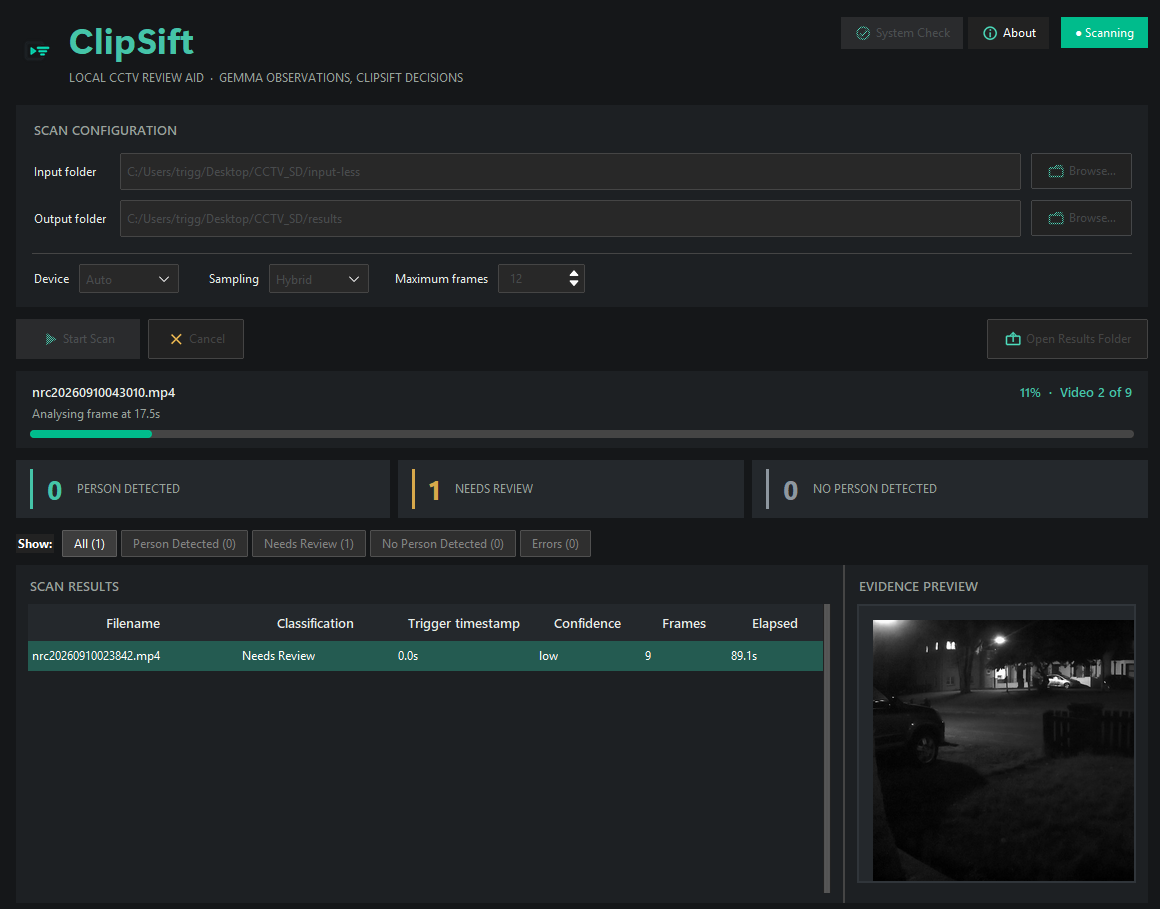
Desktop GUI

  • Folder and scan controls
  • Progress and safe cancellation
  • Filterable review results
  • Evidence preview and open actions
  • Offline setup diagnostics

Command line

  • Repeatable folder scans
  • System-readiness checks
  • Controlled image/video tests
  • Device and sampling options
  • Shared core scanning workflow
ClipSift desktop scan results table with clip classifications and an evidence frame preview
ClipSift v0.1.0 Alpha running a local CCTV folder scan on Windows.

05 / BEFORE YOU START

Requirements & Gemma setup.

  • Windows64-bit Windows 10 or 11
  • GPUCompatible NVIDIA CUDA GPU strongly recommended
  • Memorysafe for lower-memory GPUs; balanced needs at least 12 GiB VRAM
  • StorageApproximately 20 GB free for the app, model cache and results
  • NetworkInternet required for initial authentication and model download
SEPARATE MODEL SETUP

Gemma via Hugging Face

  1. Create or sign in to a Hugging Face account.
  2. Accept the terms for google/gemma-3-4b-it ↗.
  3. Authenticate on the same Windows account with hf auth login.
  4. Run System Check, then begin the first scan.

Gemma is downloaded separately through Hugging Face and is not inside the ZIP. The first scan downloads it to your normal per-user cache. CPU mode is available but may be extremely slow and memory-heavy.

06 / PRIVACY & SAFETY

Your footage stays on your machine.

LOCAL

CCTV footage is processed locally. Hugging Face is contacted for authentication and the separate model download—not to upload your media.

NON-DESTRUCTIVE

Original footage is never modified, moved or deleted. Generated evidence, reports and clip copies go to your selected output folder.

HUMAN-LED

No facial recognition and no identity or intent inference. ClipSift does not monitor live feeds or make security decisions.

07 / DEMONSTRATION

See the workflow in action.

A demonstration using privacy-safe footage. Playback is embedded with YouTube's privacy-enhanced domain.

08 / FAQ

Questions,
answered.

Need maintained setup detail? Read the README ↗

Does my footage leave my computer?

No. Video inference runs locally. Hugging Face network access is for authentication and downloading Gemma separately.

Why isn't Gemma included?

Gemma is a gated model under its own terms. Accept access and authenticate, then it downloads to your normal per-user cache.

Does ClipSift identify people?

No. There is no facial recognition, identity inference or intent inference. It assesses whether a person may be visible.

Will it change my recordings?

No. Originals are only read. ClipSift writes reports, evidence and flagged/review clip copies to the output folder.

Can I run it without an NVIDIA GPU?

CPU mode exists, but may be extremely slow and memory-heavy. A compatible NVIDIA CUDA GPU is strongly recommended.

What do I try when setup fails?

Extract the entire ZIP and keep _internal beside ClipSift.exe. Confirm Gemma terms and hf auth login, available disk/VRAM, supported video types, and a writable output folder. Then run System Check. Reports are written to your selected output folder.